eco2lot feature · Less clicking. Just ask.

Maja

“Show device 35112.” — “How do I create a meter?” Maja is the AI assistant in eco2lot: you describe what you need. Maja opens the view, explains the way or executes the released action. Your data stays in eco2lot.

  • Find, analyze, understand, execute — with one question
  • Maja sees only what you are allowed to see
  • Your data stays in eco2lot
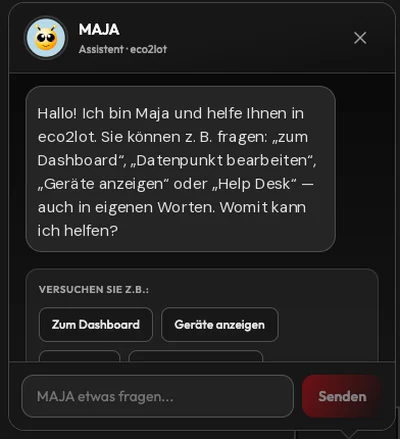
my.eco2lot.de · Maja Maja window
Maja window in detail: greeting, suggestions “To the dashboard” and “Show devices”, input field and send button
What is Maja in eco2lot?

Maja is the AI assistant in eco2lot. She adds a second operating level to menus, filters and dashboards: natural language. You describe what you are looking for or want to do — Maja knows the structure of eco2lot, checks your permissions and delivers the direct route: a link to the device, a prepared view with period, a step-by-step guide or an executed action. The data Maja works with stays within the eco2lot environment. The decision stays with you: Maja assists.

How it works

From question to action

From question to action: how Maja works Four steps in one band: the user asks a question, Maja recognizes the intent, eco2lot checks whether the object exists, whether access is allowed and the action released, and delivers the result. Below three result types with example: a prepared view with period, a step-by-step guide and an executed action with confirmation. Every request takes the same path Understand, check, deliver — a result emerges only after the check. Permissions always apply 1 Question “Show device 35112.” 2 Maja understands recognize intent 3 eco2lot checks exists? · allowed? 4 Result Link · help · action three result types View “Show 35112 from 1 to 7 September.” History with the period set — opened directly Guide “How do I edit a device?” Step by step from guides and documentation Action “Create a feed counter for Electricity consumption.” Feed counters for matching data points + confirmation eco2lot checks before every result: object present? · access allowed? · action released? Maja assists — the decision stays with the human, the data stays in eco2lot.
Every request takes the same path: Maja recognizes the intent, eco2lot checks object, access and release — only then does the result emerge: a view, a guide or an executed action.
What it looks like

What it looks like

Maja is part of the eco2lot interface: a window that sits above the current view. You type a question or choose a suggestion — the way to view, guide or action starts right where you are working.

Workspace
A window that accompanies the work

Maja sits above the current view — table, dashboard or device stay visible. The icon at the bottom left opens and closes the window.

Greeting
Suggestions to start, questions in your own words

Maja offers examples such as “To the dashboard” or “Show devices” as buttons. If you prefer typing, write the question in your own words into the input field.

From finding to executing

What you can ask Maja

Maja replaces no interface — she complements it. When you know what you want to do, Maja takes you straight there. The functions range from finding via analysis and help to the executed action.

Two operating levels: classic in five steps, with Maja in one question On the left the classic route to a device analysis: open menu, choose device directory, search, open device, set period. On the right the same route with Maja: the question “Show device 35112 from 1 to 7 September” leads directly to the prepared analysis. Both routes remain available and end at the same goal. Two operating levels — one range of functions Menus, filters and dashboards stay. Maja adds the shortest route. The same scope — a shorter route Classic operation 5 steps 1 Menu choose area 2 Devices open directory 3 Search type name or ID 4 Device open hit 5 Analysis set period ✓ Goal: analysis with period With Maja 1 question You “Show device 35112 from 1 to 7 September.” M Device found, access checked. Period 01.09.–07.09. recognized. Open analysis → ✓ Analysis device 35112 with period same goal Both routes stay. Those who prefer clicking click. Those who know what they want describe it to Maja — and arrive directly.
Two operating levels, one range of functions: the classic route leads via menu, directory and search to the device. With Maja you describe the goal in one sentence — the route gets shorter, the interface stays.

Find & navigate

Straight to the right place — modules, devices and objects by question or ID.

  • “Show me the devices.” — Maja recognizes the feature and opens the device overview
  • “Go to ID 35112.” — Maja checks whether the ID exists, which object type it is and whether you may access it, and delivers the link
  • Further destinations: users, reports, dashboards and other eco2lot modules

Enter the ID — open the object directly. Searching, filtering and navigating through directories becomes unnecessary.

Analyze & compare

Several data series and the period in one request — the view arrives prepared.

  • “Show 35112, 140462 and 140461 together.” — Maja checks IDs, access rights and object types; if the objects are compatible, a shared view emerges, for example a MultiChart
  • “… separately.” — Maja generates individual links
  • “Show data point 35112 from 1 to 7 September.” — object, start and end date are recognized, the view opens with the period set

State object and period directly in one request — the manual selection afterwards becomes unnecessary.

Help & knowledge

Help is where you work — ask instead of searching the manual.

  • “How do I edit a device?” — Maja recognizes the help question and answers from stored guides and documentation
  • Step by step directly in eco2lot: “How do I create a meter?”, “How do I create a report?”, “How does smartcalc work?”
  • Maja is thus an interactive form of documentation — eco2lot explains itself inside the system

Less searching in manuals and training material, faster answers for new and experienced users.

Actions & automation

For released functions Maja executes tasks directly — also for several objects at once.

  • “Create a feed counter for the data point Electricity consumption.” — Maja recognizes counter type and data point name, eco2lot searches matching data points; the feed counter derives the consumption per period from meter readings
  • Several hits? Maja processes all matching data points in one step and confirms the action
  • Further actions will be added over time — always only for explicitly released functions

Complete recurring tasks in one step instead of opening every data point individually.

In detail

What is inside Maja

Maja knows the eco2lot context

The difference to a general chat window: Maja knows the structure of your platform.

  • Works with eco2lot objects: devices, data points, meters, charts, reports, dashboards
  • Generates direct links, finds objects, prepares views
  • Delivers guides for operation and executes released actions
  • Checks every input — IDs, periods, names — before a result emerges

Your benefitMaja knows your question and the context in eco2lot — the answer is a link, a view or an action, no general information.

Permissions remain intact

Maja works within the existing permission concept of eco2lot.

  • Every request is checked: does the object exist? May you access it? May you execute the action?
  • Maja sees only what the respective user is allowed to see
  • Roles and rights from administration apply unchanged
  • Actions are traceable like any other operation

Your benefitMaja extends no rights. She offers an easier access to the information and functions that are already released for you.

Your data stays in eco2lot

Device information, readings, IDs, user rights and operating data are processed within the eco2lot environment.

  • The path is: measured data → Maja within eco2lot → answer or action
  • The contrast to general AI services: your operating data is processed in eco2lot instead of being transferred to external chatbots or public AI services
  • Maja works where your data lives — within the same system boundary as devices, data points, smartcalc, dashboards and reports
  • Permissions, data points and evaluations use the same data foundation as the rest of the platform

Your benefitAI support for confidential device and measurement data — with the certainty that this data stays inside eco2lot.

Typical use cases

How you talk to Maja

Examples from everyday work — the way questions and answers run in eco2lot: from navigation to the executed action. The IDs stand for devices or data points in your platform.

my.eco2lot.de · Maja
  1. You

    Show 35112, 140462 and 140461 together.

  2. Three data points found, access checked. The series can be displayed together.

    Open MultiChart
  3. You

    How do I change the unit of a data point?

  4. Open the data point, then Edit. In the field “Unit” choose the new unit and save.

  5. You

    Create a feed counter for the data point Electricity consumption.

  6. 3 matching data points “Electricity consumption” found. Feed counters have been created.

Navigation
You

Open the device overview.

The device overview is ready.

Open devices
Go to feature
Direct access
You

Show device 35112.

Device 35112 was found. Access checked.

Open device
Several data series
You

Show 35112, 140462 and 140461 together.

Three data points found. The objects can be displayed together.

Open MultiChart
Go to feature
Separate views
You

Show 35112 and 140462 separately.

Two objects found — here are the individual views:

Open 35112 · open 140462
Period
You

Show 35112 from 1 to 7 September.

Data point 35112, period 01.09.–07.09. recognized. The view is prepared.

Open view with period
Help
You

How do I edit a device?

1. Open the device overview.

2. Select the desired device.

3. Open Edit and adjust the fields.

4. Save the change.

Interactive documentation
You

How do I change the unit of a data point?

Open the data point and then Edit. In the field “Unit” choose the new unit and save.

Go to feature
Action
You

Create a feed counter for the data point Electricity consumption.

3 matching data points “Electricity consumption” found.

Feed counters have been created.

Go to feature

Shown are functions available today. Further filters and actions are possible as extensions and will be added to this page as soon as they are available.

Maja + eco2lot

Your data stays in eco2lot

Maja is no data island and no external service, but an operating level for existing eco2lot features. User, permission and Maja stand within the same system boundary as your devices, data points and evaluations. When Maja opens or explains a module, it is one of these modules:

Your data stays in eco2lot: user, permission, Maja and all modules within one system boundary On the left the path user → permission → Maja: roles and rights apply, Maja sees only released data and actions. On the right the eco2lot system boundary as a frame with the modules devices, data points, smartcalc, dashboards, reports and knowledge as well as Maja within the same boundary. There is no connection to external AI services; the data stays within eco2lot. One system boundary for data, modules and Maja The path is: measured data → Maja within eco2lot → answer or action. User Your role in eco2lot Permission Roles and rights apply Maja sees only what you may see only released data and actions eco2lot · your system environment System boundary Devices Device record · IDs Data points Readings · history smartcalc Meters · KPIs Dashboards Views per role Reports Reports · dispatch Knowledge Guides · docs M Maja · AI assistant works within the same boundary as your data Your data stays within eco2lot. Device information, readings, IDs and user rights are processed within the eco2lot environment.
User → permission → Maja → only released data and actions. Devices, data points, smartcalc, dashboards, reports, knowledge and Maja lie within the eco2lot system boundary — the data stays there.
The central logic

Ask. Find. Understand. Execute.

Maja combines natural language with the eco2lot context, your permissions and released actions. The same range of functions as before — on a shorter route, within eco2lot. Your own AI assistants additionally evaluate your eco2lot data via the MCP interface: read-only, in line with roles and traceable.

  1. Ask
  2. Find
  3. Understand
  4. Execute

Maja = natural language + eco2lot context + permissions + actions — and the data stays in eco2lot.

Ask, find, understand, execute — within eco2lot Four tiles in an eco2lot frame: ask (example “Show device 35112”), find (ID, type and access checked), understand (view or guide), execute (released action). Below the formula: Maja is natural language plus eco2lot context plus permissions plus actions — and the data stays in eco2lot. The central logic — within eco2lot eco2lot · Maja works within your platform Data stays here 1 Ask “Show device 35112.” 2 Find ID · type · access 3 Understand View · guide 4 Execute released action Maja = natural language + eco2lot context + permissions + actions ✓ Your data stays in eco2lot — permissions apply, the decision stays with the human.
Your outcome

Afterwards you can …

  • Open devices and data series with one question — by name, by ID, several together, with period.

  • Clarify operating questions directly in eco2lot instead of searching the manual or asking support.

  • Complete recurring tasks such as creating feed counters for several data points in one step.

Frequently asked questions

What you should know about Maja

What is Maja?

Maja is the AI assistant in eco2lot. She adds a second operating level to the interface: you describe in natural language what you are looking for or want to do — Maja finds devices and data, prepares views, explains features and executes released actions.

Is Maja a chatbot?

That falls short. A general chatbot answers questions. Maja knows the structure of eco2lot — devices, data points, meters, dashboards, reports — and your permissions. That is why she delivers links, prepared views, guides and executed actions instead of general answers.

What can I ask Maja?

Everything from finding to executing: find & navigate (“Show me the devices”, “Go to ID 35112”), analyze & compare (“Show 35112 and 140462 together”, “… from 1 to 7 September”), help & knowledge (“How do I edit a device?”) and actions (“Create a feed counter for the data point Electricity consumption”).

Can Maja open devices directly?

Yes. Name the device or its ID. Maja checks whether the object exists and whether you may access it, and provides the direct link — without search, filter or directory navigation.

Can I search objects by ID?

Yes. “Go to ID 35112” is enough. Maja recognizes which object type it is — for example device or data point — checks your access rights and opens the matching object.

Can Maja show several data points together?

Yes, if the objects are compatible. Maja checks IDs, access rights and object types. If the series can be displayed together, a shared view emerges, for example a MultiChart. With the addition “separately” you receive individual links. Whether a shared display is possible always depends on the object type.

Can I state a period directly in my question?

Yes. “Show data point 35112 from 1 to 7 September” — Maja recognizes object, start and end date, checks the inputs and opens the view with the period set. The manual selection afterwards becomes unnecessary. Further filters can be added over time.

Can Maja explain to me how eco2lot works?

Yes. Maja recognizes help questions and answers from stored guides and documentation — step by step, directly in the system. Examples: “How do I create a meter?”, “How do I create a report?”, “How does smartcalc work?”. For training and deeper knowledge the wiki complements the offer.

Can Maja execute actions?

Yes, for functions released for it. An existing example: “Create a feed counter for the data point Electricity consumption” — eco2lot searches matching data points, creates the feed counters (they derive the consumption per period from meter readings) and Maja confirms the action. Further actions will be added over time, always only for explicitly released functions.

Can Maja edit several data points at the same time?

For creating feed counters: yes. If several data points are called “Electricity consumption”, Maja processes all matching hits in one step instead of you opening every data point individually. Further bulk actions are possible as extensions and will be added here as soon as they are available.

Which rights does Maja have?

The same as you. Maja works within the permission concept of eco2lot: every request is checked for whether the object exists, whether you may access it and whether you may execute the desired action. Maja extends no rights — she offers an easier access to what is already released for you.

Can Maja access data that I am not allowed to see myself?

No. Maja sees only what the respective user is allowed to see. Roles and rights from administration apply unchanged; actions are traceable like any other operation.

Is my data transferred to external AI services?

The data Maja uses — device information, readings, IDs, user rights and further operating data — is processed within the eco2lot environment and is passed neither to external chatbots nor to public AI services. Maja works where your data lives.

Does Maja replace the normal eco2lot interface?

No. Dashboards, device overviews, data point views, reports and menus remain fully in place. Maja is a second operating level: the same range of functions on a shorter route. Those who prefer clicking click; those who ask reach their goal faster.

Can I also connect my own AI assistant to eco2lot?

Yes, via the MCP interface (Model Context Protocol). It is the exit towards AI: your own assistant reads values, KPIs and relationships from eco2lot and works with them — analyses, comparisons, summaries. Access is read-only, in line with roles and traceable. Maja remains the assistant within eco2lot.

Can Maja take over further functions later?

Yes, Maja is developed in maturity levels: further filters for prepared views, further released actions, questions about your data in natural language. New functions appear on this page only once they are available — the principles remain: permissions apply, the decision stays with the human, the data stays in eco2lot.

Does Maja fit the way you work?

Describe your starting point and your goal — we get back to you with a concrete recommendation of matching features and solutions, plus a price indication.

Configure your solution
Esc or click outside to close