
Collaboration & documentation
Recognizing a load peak is the first step. Recording the cause, describing the action and attaching the maintenance report — that turns a dashboard into a shared information and work space for the whole team.
- Hints right on the dashboard
- Causes and actions documented
- Documents where they are needed
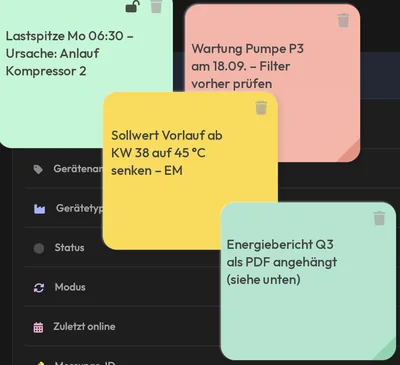
Sticky notes, comments and file attachments form the collaboration layer in eco2lot. Sticky notes place hints right on the dashboard. Comments document assessments and actions for an analysis. File attachments connect test reports, maintenance reports, manuals and photos with the dashboard or device. This way data is linked with knowledge, assessments and documents.
Knowledge stays at the dashboard
Four views from a demo tenant: sticky notes on the device dashboard, an attached operating manual, a comment right at the measuring point and the log of who changed what and when.
Load peak, maintenance date, setpoint change, report: everyone in the team sees the hints when opening the dashboard.
The operating manual opens in the dashboard — instead of a search on the network drive or in the folder in the control cabinet.
One click on the point in the chart opens the comment — with series, value and time. From now on the cause stands exactly where it occurred.
Who changed which value and when? The log records it — important for audit and handover.
What is inside Collaboration & documentation
Sticky notes
Place hints and additional information right on a dashboard — coloured, movable, visible to everyone.
- Reminder of a date or an inspection
- Explanation of an anomaly in the chart
- Information on an ongoing action
- Note for the next shift or for colleagues
Your benefitThe knowledge stands where the numbers are — instead of in emails or on slips of paper.
Comments
Assess and document analyses together — with timestamp and author.
- Record the cause of a load peak
- Comment on a fault and add the status
- Document an analysis result
- Describe the action and name the people responsible
Your benefitDiscussions become documented decisions — traceable even after months.
File attachments
Connect documents directly with a dashboard, an analysis or a device.
- Test reports and maintenance reports
- Energy reports and evidence for the audit
- Technical documentation and operating manuals
- Photos of the control cabinet and PDF files
Your benefitAt the audit and at handover everything is in one place.
How a team works with it
A typical sequence from the anomaly to the documented action.
1 · Recognize
The heatmap shows a load peak every Monday morning. The energy manager attaches a sticky note to the dashboard: "clarify cause".
2 · Assess
Maintenance comments: the start-up of compressor 2 and furnace 3 coincide. The comment stays at the analysis.
3 · Prove
The maintenance report of the compressor is attached as PDF — the start-up current values are in it.
4 · Act
The action — staggered start-up via schedule — is described in the comment and implemented in the automation. The sticky note is archived.
Afterwards you can …
-
Record insights before they get lost in everyday work.
-
Document causes and actions for audit and handover.
-
Find documents where they are needed — at the device, at the dashboard.
What you should know about Collaboration & documentation
Who sees sticky notes and comments?
Everyone who may see the respective dashboard. The permissions of the dashboard also apply to notes, comments and file attachments.
Which file types can be attached?
PDF, images, Office documents and other common formats. PDF files and images open directly in the dashboard, with no download.
Do comments stay traceable?
Yes. Every comment carries timestamp and author. In addition, eco2lot logs changes to values and settings — important for ISO 50001 and internal audits.
Goes well with this

Is Collaboration & documentation the right fit for your task?
Describe your starting point and your goal — we get back to you with a concrete recommendation of matching features and solutions, plus a price indication.
Configure your solution